

If you are a therapist looking at your website wondering why it is not pulling clients in, the answer is almost never “the colors.” It is one of three things: the site does not earn trust fast enough, it is not clear who you actually help, or the booking step is harder than picking up the phone.
The honest answer for what website design for therapists really comes down to is this. Your site has to do three jobs in a very specific order. Build trust in the first five seconds, give a potential client total clarity on whether you are the right fit, and then make booking the next step feel easy and low-pressure. Get those three right and the rest of the design choices fall into place.
This guide walks through how to build a therapist website that actually books clients without making you cringe at how “salesy” it feels. We will cover how trust gets earned (or lost) on the homepage, the three questions every prospective client is silently asking, the booking and HIPAA decisions you actually need to make (and the ones that get over-hyped), how to handle pricing and insurance honestly, what to put on each page, the platform and tool stack we recommend, and the small conversion tactics that quietly move the needle. No bro-marketing, no pushy hooks, no advice that turns a therapist’s site into something that feels off-brand for the work.
Website Design for Therapists: What Your Site Is Actually Supposed to Do
Strip away the visuals for a moment. Your therapy website has one practical job. Take a stranger who is in some kind of pain (anxious, grieving, navigating a relationship, parenting through something hard) and move them from “I am scrolling on my phone at 11pm” to “I emailed someone” or “I booked a consult.”
That is it. That is the whole game. Pretty colors, tasteful fonts, a calming aesthetic, all of it has to support that one outcome. If those elements are not actively helping a stressed person take a small brave step, they are decoration.
Most therapists I see make one of two design mistakes. Either the site is so clinical and credential-heavy it feels cold, or it is so soft and abstract that nobody can figure out what the therapist actually does. The right site lives between those: warm enough to feel safe, specific enough to feel real.
Trust: How Your Site Earns It in 5 Seconds
Trust on a therapist site is built faster than people think. By the time a visitor scrolls past your hero section, they have already made a half-conscious call on whether they could imagine sitting in a session with you.
Here is what actually moves that trust dial:
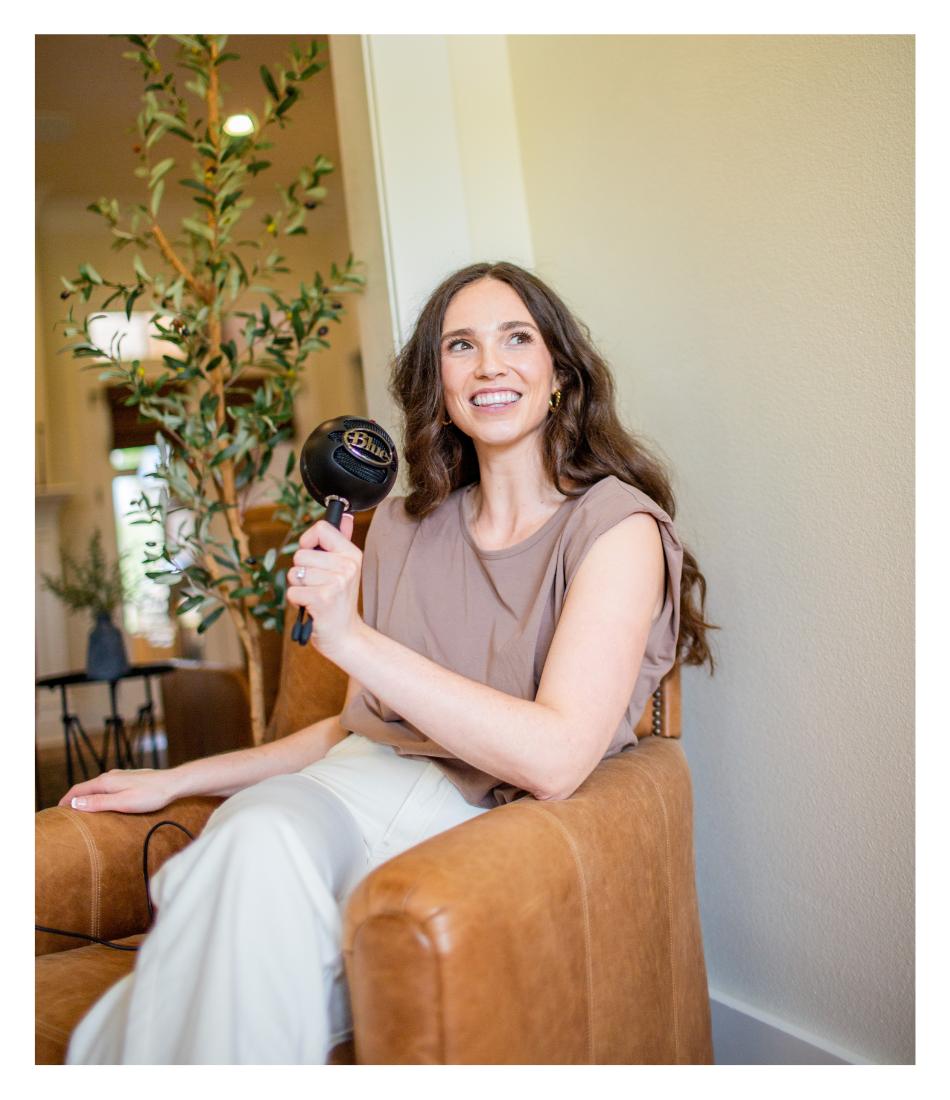
- A real photo of you. Not a stock photo of a journal and a candle. Not a faceless illustration. A real, professional photo of your face, in a space that feels grounded. Visitors decide whether they trust you in part by looking at your eyes.
- Your credentials, but not screaming. Name your license type and where you are licensed. Visitors need that signal, but they do not need a scrolling certification list above the fold.
- Plain, human language. Therapy site copy should sound the way you sound in session. Clear, calm, direct. Not academic, not buzzword-y, not “elevate your healing journey.”
- A specific niche or specialty. Trust climbs fast when a visitor reads “I work with women navigating infertility” instead of “I help people heal.” Specificity reads as competence.
- Some kind of social proof. Reviews, testimonials (with the right ethical considerations for your jurisdiction), a podcast you have been on, a publication you have written for, anything that signals other people have trusted you.
Notice what is not on this list. A fancy animation. A custom font that nobody can read on mobile. An “above the fold hero quote” that takes 14 seconds to fade in. Trust is built by clarity and warmth, not by visual flourish.
Clarity: The Three Questions Every Potential Client Is Asking
Within the first five seconds of landing on your site, every potential client is silently running through three questions. They do not realize they are doing it.
- Does this person help with what I am dealing with?
- Are they someone I would feel safe with?
- What do I do next if I want to talk to them?
If your homepage does not give clean, fast answers to those three above the fold, most visitors leave. Not because they would not be a great fit. Because thinking is hard, and finding a therapist while you are already overwhelmed is its own kind of work.
The fix is specific. Your hero section needs three things. A headline that names the population you serve and the issue you treat. A sub-headline or short paragraph that describes the result of working with you (not the modality, the result). And one bright, clear call-to-action button that goes to a contact, booking, or consultation page. Everything else on the homepage is supporting evidence for those three answers.
I see this all the time, by the way. A therapist will spend three weeks picking the right shade of sage green for the hero and never ask whether the hero copy answers those three questions. The aesthetic is gorgeous. The hero is failing. Fix the questions first.
Booking: Make the Next Step Easy (Without the HIPAA Spiral)
Here is where therapist web design gets uniquely tangled. You need an easy way for someone to take the next step, and you also need to be careful with protected health information. A lot of therapists end up building nothing because the HIPAA fear paralyzes them.
Real talk: HIPAA energy belongs on your practice management system, not your public marketing website. If your website only collects basic contact info (name, email, “what brought you here today” in a non-clinical way) and that info routes into a HIPAA-compliant practice management tool, you are in a fine starting place. You are not storing PHI on the marketing site itself.
The clean stack most therapists use looks like this. The marketing site (your WordPress site, your Squarespace, whatever) handles trust building and routes interested visitors to either a contact form, a phone number, or a HIPAA-compliant scheduler. The HIPAA-compliant booking, intake forms, telehealth, and clinical notes all live in a tool built for it: SimplePractice, TherapyNotes, TheraPlatform, or IntakeQ. Those tools sign Business Associate Agreements with you. Your scheduler embed on the website is just the public-facing slot picker pointing to your HIPAA-compliant calendar inside that tool.
Calendly works for non-clinical scheduling (a free 15-minute consult call, for example) but is not signed under a BAA, so do not use it for full intake or any booking that gathers PHI.
A few practical booking design notes:
- Put the same primary CTA in the same place on every page so visitors do not have to hunt for it
- Offer at least two contact paths (a form and a phone number, or a form and a scheduler) because different clients have different comfort levels
- Keep contact forms short. Name, email, a “what brought you here” field, and that is plenty. Long forms feel like work to a person who is already exhausted
- Include a brief crisis disclaimer where appropriate: “This site is not for emergencies. If you are in crisis, please call or text 988.” It builds trust and protects you
The Pricing and Insurance Question
This is one of the biggest conversion levers on a therapist website, and one of the most commonly skipped sections.
Visitors want to know two things before they reach out. What does this cost, and do you take my insurance. If they cannot find that on your site, most of them will close the tab and go look at someone who tells them.
The honest move is to put your fees and your insurance situation on the site clearly. If you are private pay, name your session fee or fee range and link to your superbill / out-of-network reimbursement guidance. If you take insurance, list the panels you are in. If you offer sliding scale, describe how that works in plain language.
I know this feels uncomfortable. But hidden pricing does not protect you, it costs you. The clients who book a consult after seeing pricing are the ones who can actually afford to work with you. Everyone else self-selects out, which saves both of you a phone call.
What to Put on Each Page
Most therapist sites need fewer pages than therapists think they do. Here is the lean structure that works for a solo or small practice.
Home. Hero section that answers the three questions. A “what I help with” section that names your specialties. A short “about me” snapshot with your real photo. A how-it-works or what-to-expect block. Social proof if you have it. A clear closing CTA.
About. This is where personality lives. Your training and credentials, yes, but also why you do this work, what your sessions feel like, who you tend to work best with. Sound like yourself. Resist the urge to write in third person; “I” reads more human.
Services / Specialties. One page or one page per specialty, depending on how distinct your offerings are. For each: who it is for, what they will work on with you, what the format looks like (in-person, telehealth, intensive, group), and a CTA to book or contact.
Fees / FAQ. Pricing, insurance, sliding scale, cancellation policy, telehealth states you are licensed in. Bundle the practical questions here so they are easy to find.
Contact. Short form, phone number if you take calls, and a clear note about response times and crisis resources. If you have a HIPAA-compliant scheduler, link to it here.
That is it for most practices. Five pages. You do not need a blog unless you genuinely want to build an SEO content strategy, which is a separate commitment. A clean, sharp five-page site outperforms a sprawling 18-page site for most therapists.
Platform and Tool Stack for Therapists
Most therapist website advice will hedge on platform. I will not.
If you are DIYing the site yourself with no design budget yet, Squarespace is a fine place to start. The templates are calm, the editor is approachable, and you can launch in a weekend.
If you are hiring a designer or you want a site you can grow into for years, build on WordPress with Elementor as your page builder. WordPress gets a bad rap because there are a million ways to set it up, plus the WordPress.com vs WordPress.org confusion. Set up properly from the start, with a builder like Elementor giving you drag-and-drop editing, building a WordPress site is actually a very pleasant experience.
For booking and clinical work, use a HIPAA-compliant practice management platform. SimplePractice and TherapyNotes are the two most therapists land on. TheraPlatform, IntakeQ, and Jane are also strong options. Pick the one whose calendar, telehealth, and notes feel right and embed its scheduler on your marketing site.
For free 15-minute consult calls (no PHI involved), Calendly is fine. Do not use Calendly for full intake.
For email marketing, if you do a newsletter, Flodesk and ConvertKit (now Kit) are the most therapist-friendly. Mailchimp works but is heavier than most therapy practices need.
For hosting, HostGator’s Baby plan handles a six-page therapist site without breaking a sweat. Note that intro pricing is intro pricing; renewals are higher. If you want more speed or you grow into a content-heavy blog, step up to SiteGround.
The Small Conversion Tactics That Quietly Move the Needle
This is where website design for therapists gets technical in the right way. None of these are tricks. They are how a strategically designed site nudges someone from “looking around” to “I’m going to email her.”
Bright button colors. Your primary CTA buttons should be one of the boldest colors on your site. If they blend into the calming background palette, visitors miss them. Pick a CTA color that pops against everything else and use it consistently across the whole site.
Hover effects on buttons. A small visual change when someone hovers over a button creates a tiny dopamine spike that makes the click more likely. Sounds silly. It works. A subtle color shift or a soft shadow does the trick.
Picture direction matters. People in your hero or section images should be facing INTO the content, not away from it. The visitor’s eye follows where the person in the photo is looking. Use that.
Simple highest-priority CTA sections. When you really want someone to click (“ready to schedule a consult?”), strip the section down. Headline, one short sentence of context, the button. No competing elements, no extra graphics. Less is conversion.
Visual hierarchy. Big things look important; small things look like detail. Your offer, your CTA, and your value prop should be visually loudest. If the loudest element on the page is your stock photo of a houseplant, the houseplant is winning.
The journey on a strategic therapist site is quiet and intentional. A potential client lands stressed. They see your face, they read a headline that names their issue, they exhale a little. They scroll, they understand what working with you looks like, they spot a clear, gentle CTA, they take the next step. That is the whole arc. Strategy makes it possible.
Branding Should Feel Like You, Not Like Everyone Else
A clean visual brand makes a therapist site feel like one trustworthy place instead of three pieces of stock content stitched together. Same color palette, same typography, same photo treatment across every page.
You do not have to do branding and a website at the same time. If your visual brand is already solid, just build the site to match. If your brand is messy, fix that first or do them together. We offer a Brand and Website Combo for owners who need both done at once. Plenty of therapists only need one or the other.
A small brand note specific to therapists. The “calming pastels and minimal typography” look has become almost a cliche in this niche. There is nothing wrong with calm, but specificity will set you apart faster than aesthetic conformity will. Your brand should feel like you, not like the eight other therapists in your zip code.
Plan the Site Before You Build It
The number one reason therapist websites underperform is not the design. It is that nobody planned the site before they built it.
We recommend going through the Strategic Website Planner before you start, whether you are DIYing or hiring. It is a self-serve tool that walks you through what your site needs to do, who you serve, what action you want a visitor to take, and how each page should support that. Therapists who do this work first end up with sites that book clients. Therapists who skip it end up with pretty sites that do not.
If you want a structured way to write the actual copy on each page, the Honeywave Content Writing Guide gives you a section-by-section framework so the copy is conversion-driven from the first sentence.
What “Done” Actually Looks Like for a Therapist Site
A therapy website is “done” when these are all true:
- A stranger lands on the homepage and within five seconds knows who you help, what you treat, and what to do next
- Your real photo is above the fold
- Your specialty or niche is clear in the headline
- The primary CTA is impossible to miss
- Pricing or a fee range is visible somewhere obvious
- Insurance status is clear (taken, not taken, sliding scale)
- The contact path is short and easy
- Booking flows into your HIPAA-compliant practice management tool
- A brief crisis disclaimer is present on contact-related pages
- The site loads in under three seconds on mobile
If you can check those boxes, you have a working site. The rest is decoration on top of working, which is what decoration is for.
Bringing It All Together
The “no-fluff” answer to website design for therapists is build a site that earns trust quickly, gives a stressed person total clarity on whether you are right for them, and makes the next step feel light. Lead with a real photo and a specific niche. Be honest about pricing and insurance. Run booking through a HIPAA-compliant tool. Use bright CTAs and simple sections in the moments that matter. Plan the site before you build it.
If you do those things, your site will already outperform 80% of therapist sites in your area, because most therapists default to a calming palette and forget the strategy underneath.
If you are ready to skip the DIY learning curve and have a designer build the whole thing in a single day (real photo, branded design, booking integration, and all), our One Day Website is built for exactly that. We have delivered 500+ websites and have 120+ five-star Google reviews from owners (including therapists) who needed something that actually books clients, not just looks nice. You can see current pricing and book your day on the page. Take a look at our portfolio and our services page to see what hiring Honeywave looks like.
The goal is not a therapy website. The goal is a therapy website that helps the right clients take the next step. That is the difference, and now you know how to design for it.